
One platform for the work your operation needs to get done

Organize requests, maintenance, project work, training, and recurring tasks in workflows your team can configure and follow.

Built for operations teams across facilities, manufacturing, fleets, service, and robotics.
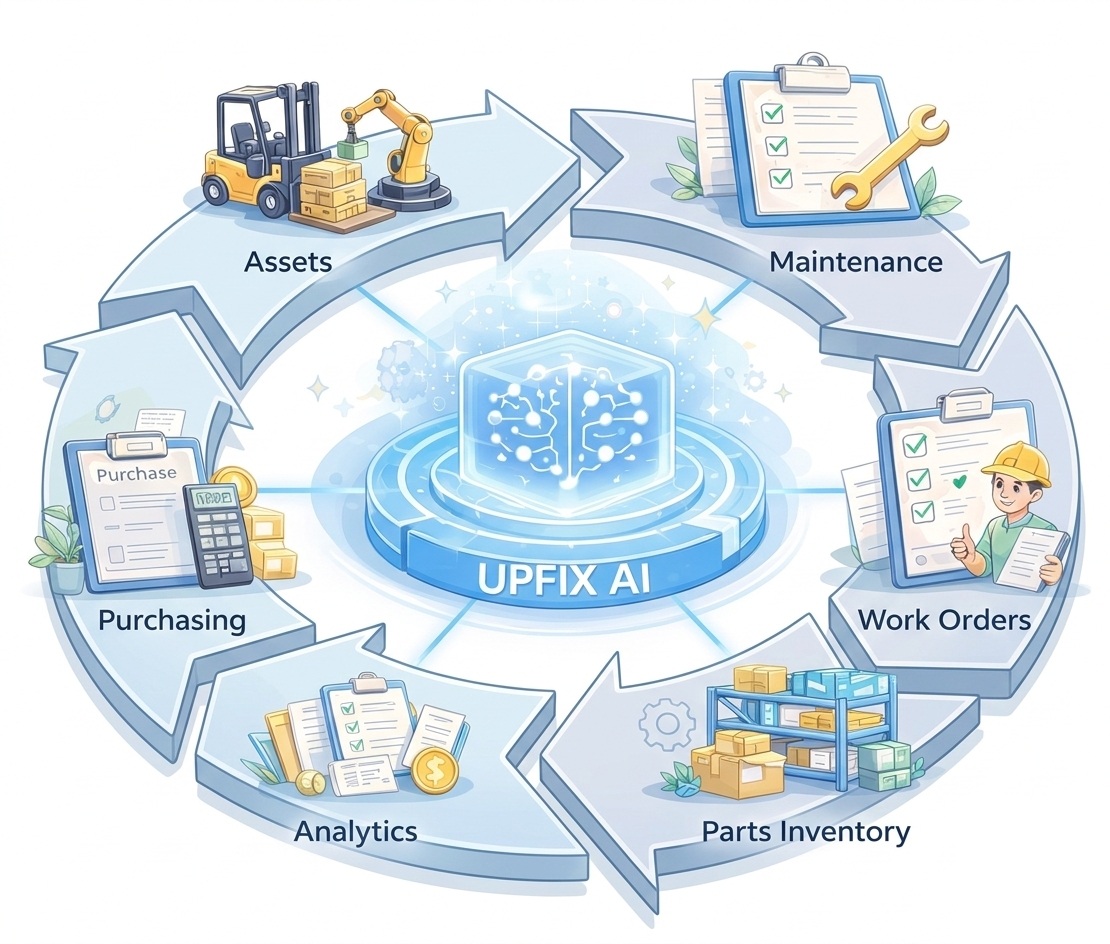
UpFix connects operational work, assets, maintenance, inventory, and analytics

Free includes Work Items (including maintenance work orders) and basic procedures within its capacity limits. Recurring maintenance automations require Team or Pro. Inventory, purchasing, analytics, the UpFix Assistant, and multiple sites require Pro. Compare capabilities and limits.

Before UpFix

Manual, fragmented maintenance operations

  • Maintenance tracked in spreadsheets
  • Preventive maintenance often missed
  • Manuals difficult to access
  • Parts shortages delay repairs
  • Institutional knowledge scattered

With UpFix

Connected, automated, AI-assisted reliability

  • Centralized asset management
  • Automated maintenance scheduling
  • AI-powered maintenance knowledge
  • Real-time parts inventory
  • Operational visibility across sites

A workflow for every kind of work

Give each request a clear owner and next step.

UpFix supports more than maintenance. Use a shared work system for requests, project tasks, training, and the custom processes your team needs.
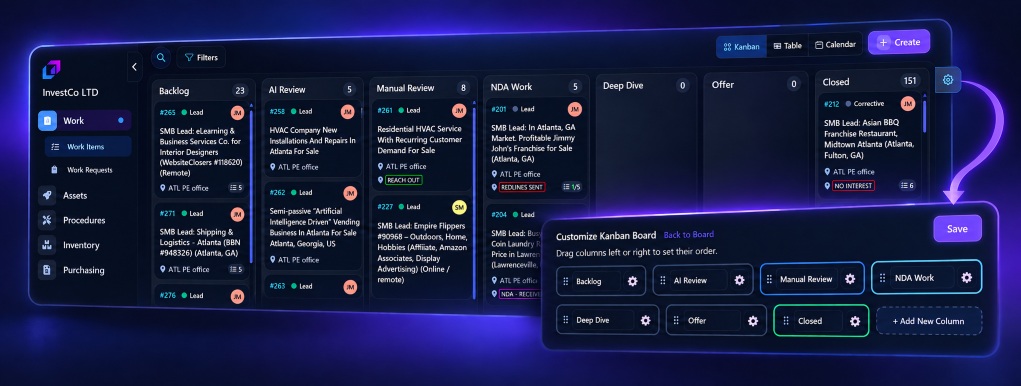
UpFix kanban board with configurable workflow columns and board settings
Arrange columns to match your team’s review and delivery process.
01

Receive and review

Let team members submit work requests. Review, prioritize, and approve items before they enter the active workflow.

02

Shape the workflow

Define work types and statuses that reflect your process, from intake and review through work in progress and completion.

03

Track more than repairs

Use project work and training work types to assign tasks, document progress, and keep follow-through visible.

Requesters can submit work requests without becoming billed seats. Access to training resources depends on organization settings.

AI That Understands Your Equipment

  • Ask questions about assets and manuals
  • Search maintenance documentation instantly
  • Troubleshoot equipment failures
  • Turn maintenance history into insights

A Complete System of Record for Your Assets

  • Track equipment across sites
  • Store manuals and documentation
  • View maintenance history
  • Organize assets with tags and groups

Manage Maintenance Work Visually

  • Track work item progress
  • Assign technicians
  • Organize tasks clearly
  • Maintain visibility across teams

Plan Maintenance With Confidence

  • Drag and drop scheduling
  • Visualize maintenance workload
  • Review scheduled work before assigning more tasks
  • Plan maintenance by day, week, or month

Standardize Maintenance Procedures

  • Create reusable maintenance procedures
  • Convert procedures to work item tasks
  • Ensure consistent maintenance execution
  • Capture institutional knowledge

Automate Preventive Maintenance

  • Time-based maintenance triggers
  • Meter-based triggers
  • Automatic work item generation
  • Reduce missed maintenance cycles

Automatically Generate Maintenance Procedures and Triggers

  • AI generates step-by-step maintenance procedures with time estimates
  • Accept or reject AI-generated procedures with one click
  • Automatically create periodic or condition-based triggers
  • Link procedures to triggers so maintenance runs at the right time
  • Reduce manual setup using AI that understands manuals and maintenance history

Capture Tribal Knowledge in One Place

  • Capture tribal knowledge—turn scattered expertise into searchable, reusable documentation
  • Organize all maintenance manuals: centralize OEM manuals, SOPs, and procedures in one system
  • Upload knowledge to asset groups or individual assets—attach docs where they matter most
  • Organize, categorize, and tag—find what you need quickly with flexible organization
  • Powers the AI Assistant—all knowledge items and work item history fuel AI answers and guidance

Maintenance Parts Inventory

  • Track spare parts inventory
  • Link parts to work items
  • Monitor stock levels
  • Set minimum quantity alerts

Streamline Parts Purchasing

  • Create purchase orders from low-stock alerts
  • Track order status from request to delivery
  • Manage vendors and supplier pricing
  • Link received parts directly to inventory
  • Maintain a complete purchasing audit trail

Understand Your Maintenance Operation

  • Monitor open work items
  • Track maintenance trends
  • Identify recurring failures
  • Improve asset reliability

Granular Control for Your Team

  • Assign permissions by role
  • Manage access by site
  • Control system capabilities
  • Support large operations

API Integrations

  • Meter API on Pro: send usage, runtime, and other meter readings for configured maintenance triggers
  • Sensor integrations: send supported readings through the Meter API; integration setup is required
  • Work actions through MCP: find, create, and update supported work records within your permissions
  • Asset context through MCP: use supported tools to retrieve authorized asset records

Model Context Protocol (MCP)

Work with UpFix through ChatGPT, Claude, Cursor, or Codex.

Connect an MCP client to find work, review details, and create or update work items using the tools your organization allows. MCP uses the connected user’s UpFix permissions and site access.

Organization administrators can review and revoke connected clients. MCP is an external integration, separate from the UpFix Assistant built into the app.

Connect your preferred client

  • ChatGPT
  • Claude
  • Cursor
  • Codex
OAuth connection · organization-bound access · revocable by admins

MCP is available on every plan. Start free to connect

Give every piece of work a clear next step

Start with one workflow, then build a shared system around the way your team operates.

14-Day Pro Trial Then Free if no subscription is active No Credit Card Required