When to Switch from Excel to CMMS (And Why Most Teams Wait Too Long) [2026 Guide]
By UpFix
Excel works for starting maintenance, but it quietly fails as complexity grows. This 2026 guide shows clear warning signs, a switch checklist, and what changes with CMMS.
![When to Switch from Excel to CMMS (And Why Most Teams Wait Too Long) [2026 Guide]](https://upfix-public.s3.us-east-1.amazonaws.com/blog-images/1774060612374-374c5c02-625a-4c12-b506-ad1d0363c1fd-switch_from_excel_to_cmms.jpg)
The operating models and AI examples in this article are illustrative. They are not a specification of included UpFix features or a measured customer result. See product capabilities and plan limits for the current offer.
Most teams switch too late
Excel works until it does not.
That is the uncomfortable truth for maintenance teams. A spreadsheet can look organized while your operation becomes fragile underneath. PMs slip, ownership gets fuzzy, and no one notices the risk until downtime hits.
Teams rarely move too early. Most move after avoidable pain.
If you are searching when to switch from excel to cmms, you are likely already at the decision point. For many teams, that realization starts when their equipment tracking spreadsheet stops being reliable.
Why Excel works at first and why that is valid
Using spreadsheets at the start is not a mistake. It is a practical choice.
- Everyone already knows how to use Excel
- It is low-cost and easy to launch
- You can create a tracker in an hour
- It is flexible while your process is still forming
For a smaller team with low operational complexity, this can work well.
The issue is scale. As assets, people, and locations increase, spreadsheet coordination becomes a hidden failure point.
The risk is not that your spreadsheet breaks. The risk is that it quietly lets things fail without you noticing. The failure does not show up in the spreadsheet first. It shows up in the operation.
Signs your spreadsheet system is breaking
This is the section most teams skip until it hurts. Do not skip it.
You spend too much time updating spreadsheets
If supervisors spend more time chasing updates than improving reliability, the process is upside down.
Data errors and mismatches are increasing
Conflicting versions, missing fields, and inconsistent naming start showing up every week.
Preventive maintenance is hard to track reliably
Recurring tasks depend on manual reminders and calendar memory. Overdue PMs become normal.
Ownership is unclear
Rows exist, but accountability does not. You cannot quickly answer who owns a task right now.
Work falls through handoffs
Shift changes and cross-location work create gaps. Things marked done are not actually complete.
Reporting takes too long
If your weekly status requires stitching multiple tabs and chats together, your system is already overloaded.
You cannot trust one source of truth
When people ask which file is the latest, that is your signal.
Excel vs CMMS: what actually changes
A spreadsheet stores information. A CMMS coordinates execution.
- Excel depends on manual updates. A CMMS automates recurring work and reminders.
- Excel can show an owner field. A CMMS assigns work with real accountability.
- Excel spreads history across tabs and files. A CMMS centralizes asset history.
- Excel makes reporting manual. A CMMS gives leaders real-time visibility into backlog and overdue work.
This is the real difference in the Excel vs CMMS decision. One helps you record work. The other helps you run it.
Hidden cost of waiting too long
Waiting feels safe because spreadsheets still open and still show data. The costs are just less visible.
Downtime risk rises quietly
A missed PM or delayed repair on critical equipment can trigger avoidable downtime events that cost far more than the effort of switching systems.
Inefficiency becomes the default
Manual follow-ups, duplicate entry, and reconciliation meetings consume hours every week.
Missed work becomes normalized
Tasks are postponed, forgotten, or marked complete without verification. Reliability drifts down over time.
Firefighting culture takes over
Teams spend more time reacting than preventing. That impacts morale, consistency, and long-term asset health.
What changes when you move to a system
A CMMS is not a magic button. It is a better operating structure for maintenance execution.
- Work orders are assigned with clear ownership
- Asset history is centralized and searchable
- Recurring PMs and reminders are automated
- Overdue work is visible in real time
- Leaders see backlog and completion without manual reporting
In short, spreadsheets store information. Systems coordinate action.
What this looks like in practice
A team managing 80 assets across two locations used spreadsheets to track PMs. Tasks were assigned informally, and updates depended on manual entry.
Over time, PM completion dropped below 70 percent. No one noticed until a critical asset failed and caused unplanned downtime.
After moving to a system, PM completion became visible in real time, ownership was clear, and overdue work was flagged automatically.
When you should switch checklist
If two or more of these are true, switch now, not later.
- Asset count is one signal, not a fixed cutoff. Review the need for a CMMS when shared editing, multiple sites, critical equipment, missed work, or reporting effort make the current process unreliable. The same asset count can represent very different workloads.
- Multiple people create and close maintenance work
- You run recurring preventive maintenance tasks
- You support multiple locations, lines, or shifts
- You miss PMs at least monthly
- You rely on manual reminders to keep work moving
- You cannot pull clean maintenance history in minutes
- You spend weekly time reconciling conflicting data
Practical switch plan in 5 steps
Step 1: Standardize your asset list
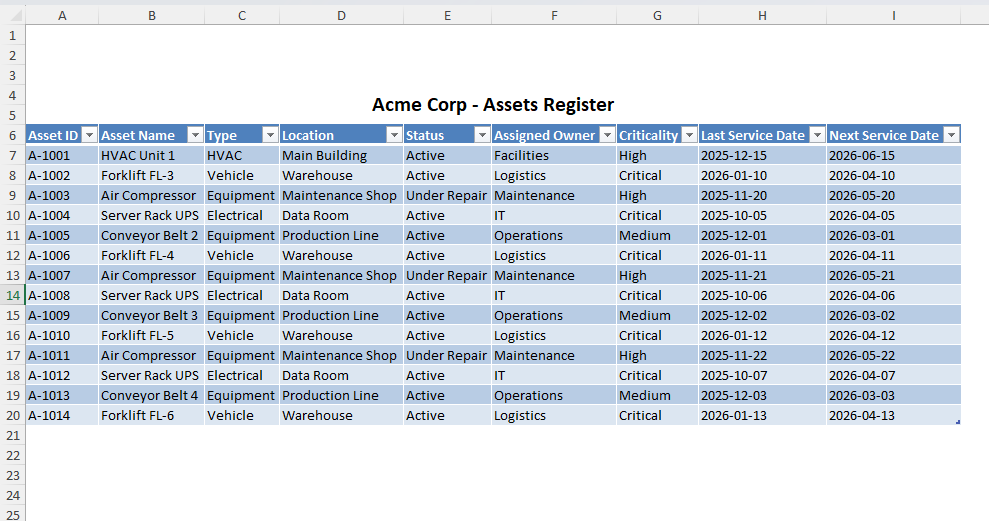
Clean IDs, names, locations, and criticality before migration.
Step 2: Define core workflows
Start with PM, corrective work orders, and closeout rules.
Step 3: Assign ownership rules
One owner per task, clear handoff, clear escalation path.
Step 4: Migrate active data first
Move open work, upcoming PMs, and critical history first. Do not try to perfect all legacy data on day one.
Step 5: Run a 30-day adoption sprint
Track completion rates, overdue trends, and update compliance. Tune process quickly.
FAQ
Can Excel still work for very small teams?
Yes. If asset count is low and one person coordinates work, spreadsheets can be enough temporarily.
What is a common tipping point?
Asset count is one signal, not a fixed cutoff. Review the need for a CMMS when shared editing, multiple sites, critical equipment, missed work, or reporting effort make the current process unreliable. The same asset count can represent very different workloads.
Do we need to migrate every old record before switching?
No. Bring active work and high-value history first, then backfill selectively.
Will a system add complexity?
A poor rollout can. A focused rollout on core workflows usually reduces complexity within weeks.
Bottom line
The biggest risk is not that your spreadsheet looks messy. The biggest risk is that it looks fine while execution quality declines.
Most teams wait too long because spreadsheets feel familiar.
If your spreadsheet is starting to feel like work itself, you are already past the point of needing another template.
If you are already seeing the signs, you do not need another spreadsheet. You need a system that actually runs the work.
Move to UpFix if you want a simpler path out of spreadsheets, or explore the full workflow on our product page.